Zoho Books Review 2026: Pricing, Features & Verdict
If you’ve been researching Wave alternatives, Zoho Books almost certainly came up. It’s the accounting software we recommend most often on this site, but a recommendation isn’t worth much without firsthand testing behind it. We set up a real Zoho Books account, poked at the features that matter most to small business owners, and tracked exactly where it impressed us and where it didn’t.
This Zoho Books review covers pricing, core features, what it’s actually like to use day to day, and who it’s a good fit for.
Quick Verdict
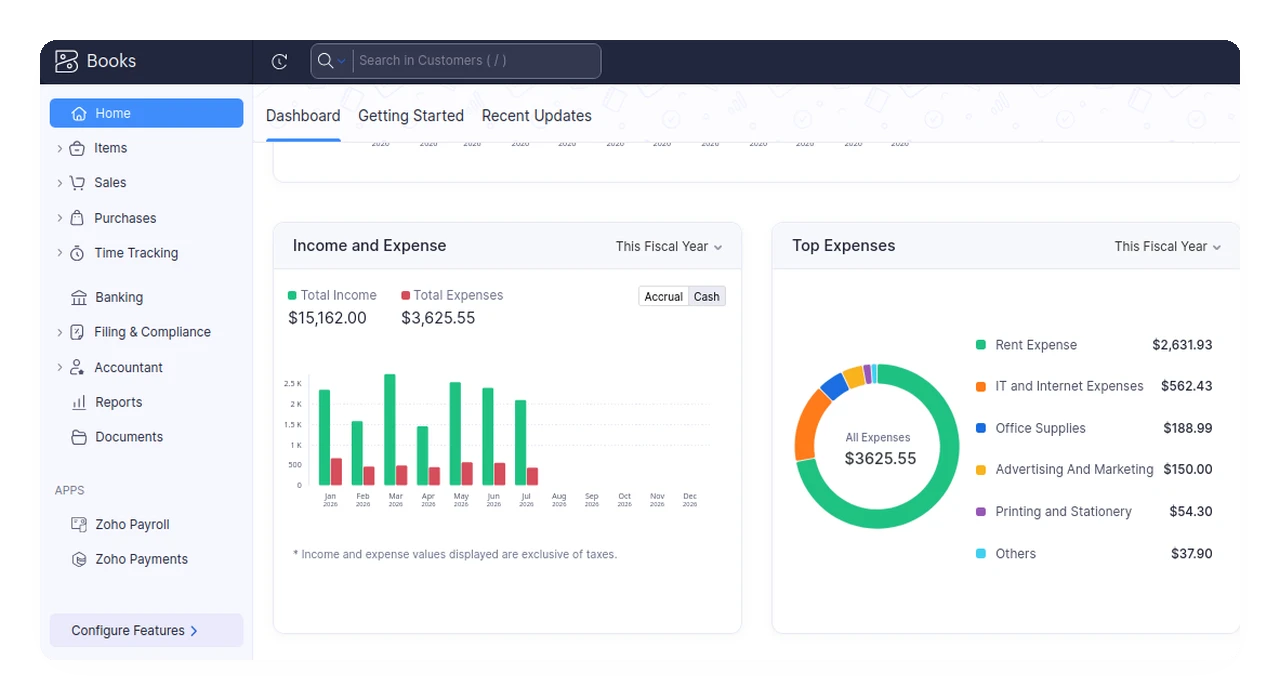
After testing it firsthand, Zoho Books’ menus and overall layout felt fairly close to what you’d find in competing accounting apps, but the interface is more visual and packs in a couple of features we haven’t seen elsewhere: built-in 1099 form filing and project-based time tracking. One friction point worth flagging up front: migrating data in isn’t always a clean export and import. Depending on the source app, you sometimes need to reformat your spreadsheets to match Zoho’s expected structure before it accepts them, and that eats time.
Best for: Freelancers and small businesses that outgrew Wave (especially outside the US and Canada, where Wave discontinued invoicing) and want room to grow without switching software again.
Zoho Books Pricing (2026)
Zoho Books runs six tiers, from a usable free plan up to Ultimate for larger teams. All paid plans are billed per organization, not per user. Extra seats cost $2.50/user/month beyond each plan’s included seats.
| Plan | Monthly Price | Best For |
|---|---|---|
| Free | $0 | 1 user, up to 1,000 invoices/year, businesses under $50,000 annual revenue |
| Standard | $20/mo | Solopreneurs needing bank feeds and 2-3 users |
| Professional | $50/mo | Businesses needing purchase orders and multi-currency |
| Premium | $70/mo | Growing teams needing custom workflows |
| Elite | $150/mo | Product/e-commerce businesses with complex inventory |
| Ultimate | $275/mo | Larger businesses needing advanced analytics |
Annual billing knocks $5-35/month off each paid tier depending on plan. Compared to Wave, which discontinued its free invoicing plan for users outside the US and Canada, Zoho Books’ free tier is still usable for very small operations rather than just a stripped-down trial.
Note: pricing verified against Zoho’s official pricing page as of August 2026. Always confirm current pricing before purchasing, since SaaS pricing changes without much notice.
Setting Up Zoho Books: First Impressions
The setup wizard asks for the basics you’d expect: organization name, business type (LLC, sole proprietor, and so on), industry, and address. There’s also an optional logo upload for your invoices and PDFs (Zoho recommends 240x240px). None of it took long to get through.
The welcome screen greets you with a short product overview video and, notably, an offer to have Zoho’s own team handle your data migration for you at no extra cost. If the reformatting friction described below sounds like a dealbreaker, that’s worth knowing about upfront. It’s a real way to sidestep the CSV wrangling entirely.
Core Features We Tested
Invoicing
Zoho Books’ invoice list shows the usual status flags (due in X days, overdue by X days) with vendor and amount at a glance, and opening an invoice gives you the full editing toolkit: send by email, share a link, set reminders, export to PDF, and record a payment directly from that screen. Line items, notes, and payment terms (Net 30 by default in our tests) sit right below the header. It’s a clean, no-frills layout that didn’t take long to figure out.
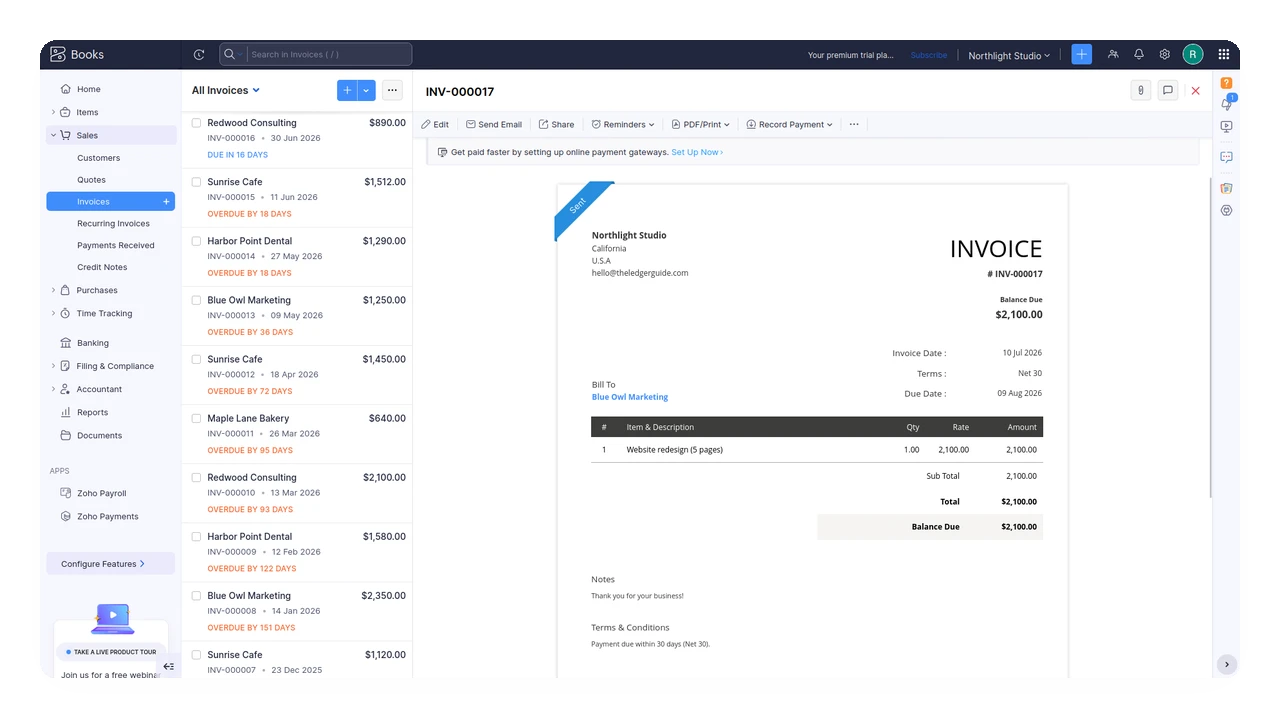
Chart of Accounts
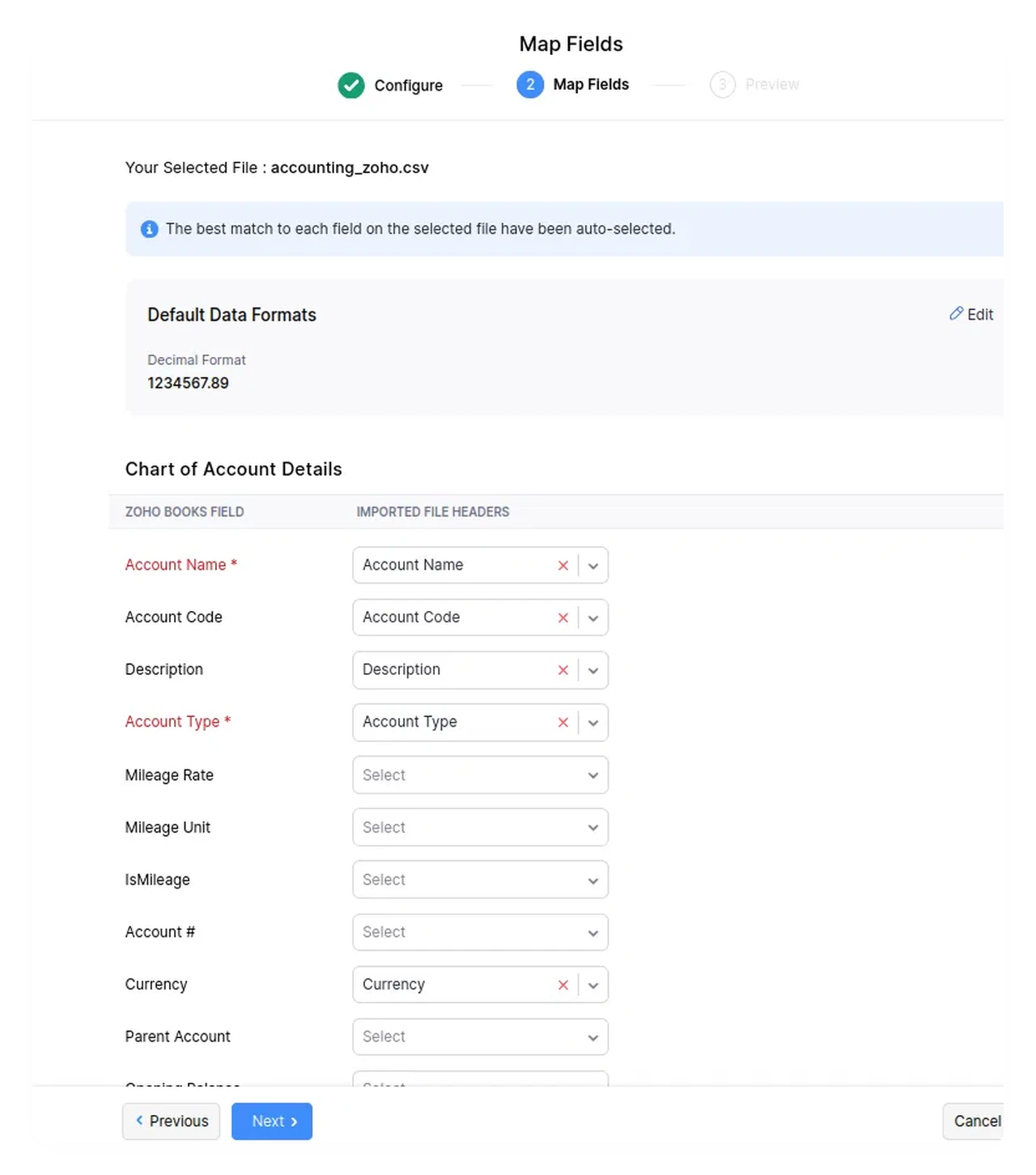
If you’re migrating from Wave, this is where most of the friction lives. We covered the specifics in our Wave to Zoho Books migration guide, including the Chart of Accounts import constraints and the 1MB file size limit on imports.
In practice, importing isn’t as simple as exporting a file from Wave and dropping it straight into Zoho. Some spreadsheets need to be reformatted to match the exact structure Zoho expects before it’ll accept the import. That’s doable, but time-consuming if you’re not expecting it. Budget extra time for this step rather than assuming a straight export and import will work.
Expense Tracking
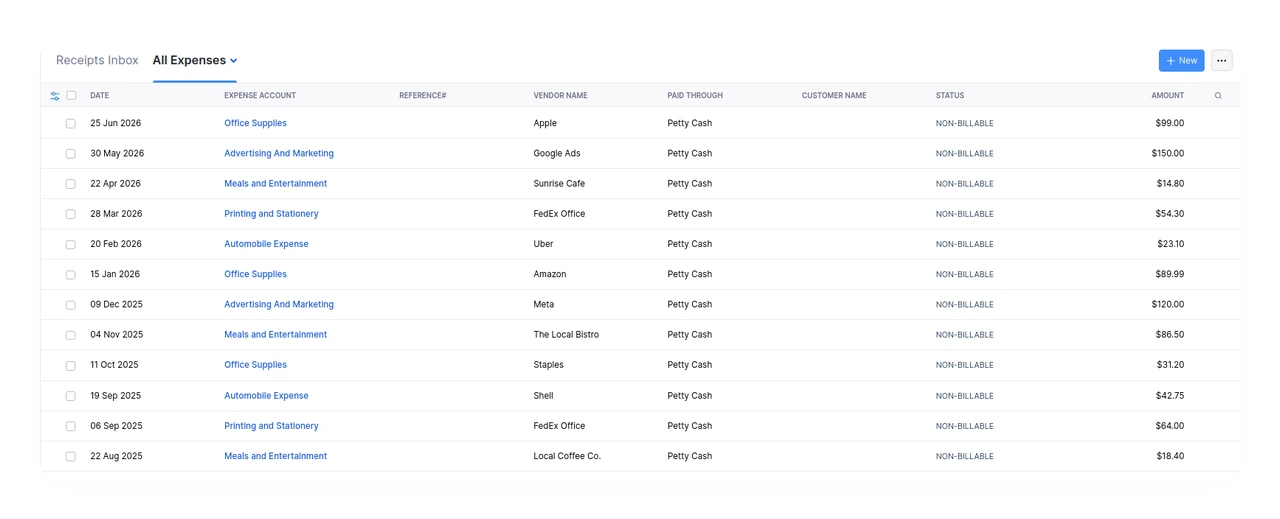
The All Expenses view lays out every expense with its account category, vendor, and how it was paid (Petty Cash in our test account). Categories like Office Supplies, Advertising and Marketing, Meals and Entertainment, and Automobile Expense are there out of the box, and each entry can be marked billable or non-billable depending on whether you’re passing the cost on to a client.
1099 Filing and Project Time Tracking
Two features stood out as things we haven’t come across in other Wave-alternative apps we’ve looked at: built-in 1099 form filing and project-based time tracking. Most competing tools in this price range either skip 1099 support entirely or push it into a paid add-on, and time tracking is usually a separate app you’d have to bolt on. Having both live inside Zoho Books itself is a genuine differentiator if either applies to how you work.
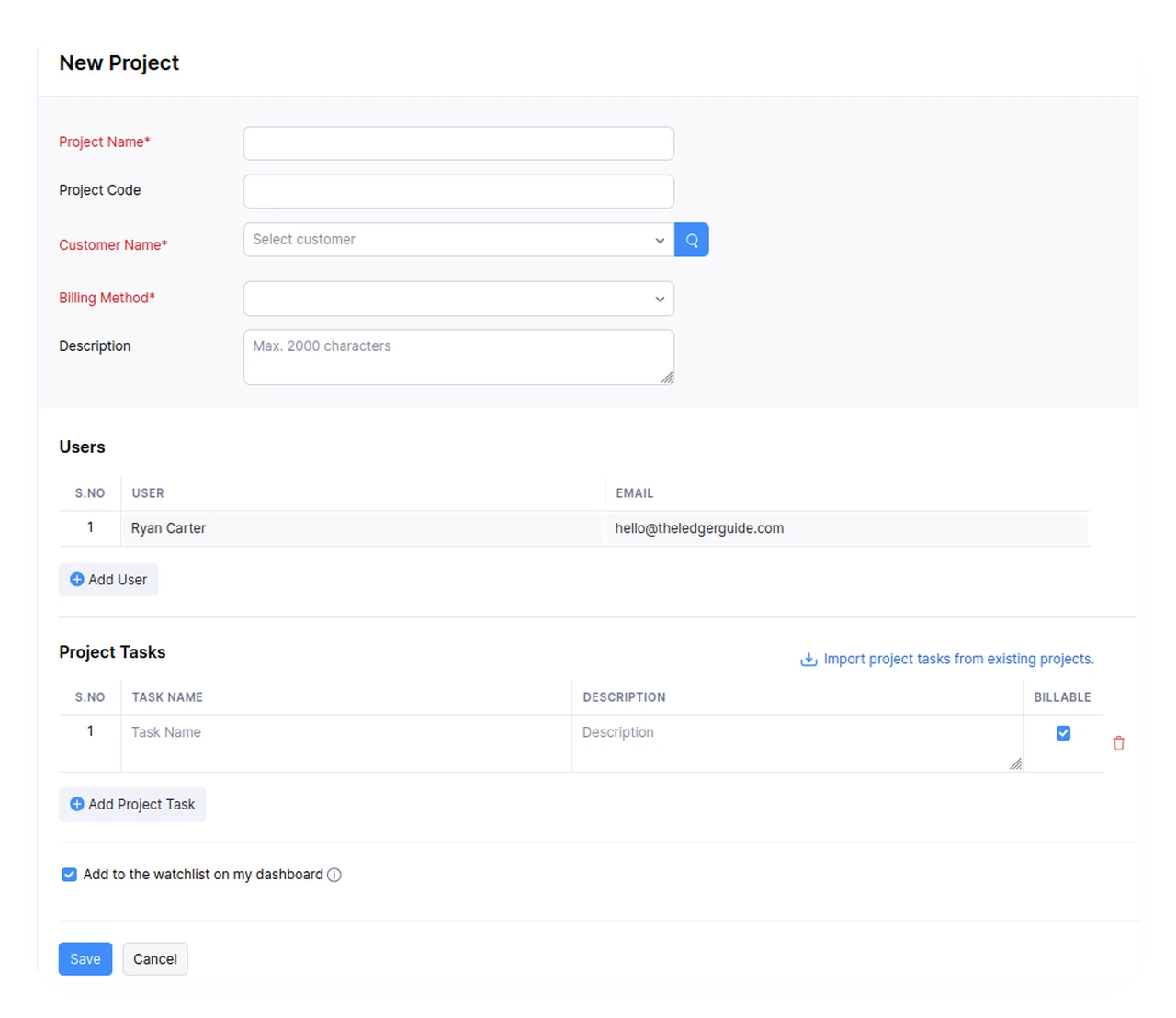
Setting up a project for time tracking is quick: name it, attach a customer, pick a billing method, add any team members, and break it into tasks you can flag as billable or non-billable. It lives in the same navigation as invoicing and expenses instead of a separate app you have to bolt on.
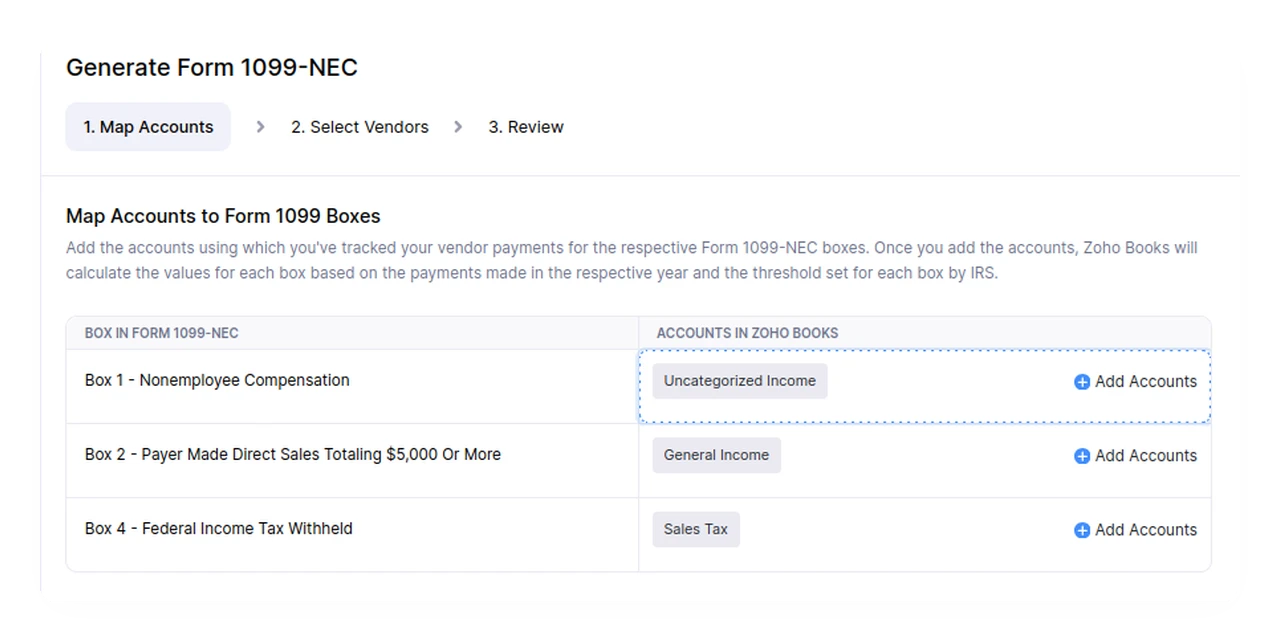
1099 filing runs through its own three-step wizard: map accounts, select vendors, review. In the mapping step, you match your existing chart-of-accounts entries to the relevant box on Form 1099-NEC, for example pointing an “Uncategorized Income” account at Box 1 (Nonemployee Compensation). Once mapped, Zoho Books calculates the amount owed per vendor automatically, based on payments already logged against those accounts.
What We Liked
- More visual and complete-feeling interface than most competing accounting apps we’ve used
- Built-in 1099 form filing, a feature we haven’t seen bundled in free other Wave alternatives
- Project-based time tracking included, without needing a separate app
- Zoho offers free migration help if the import process below feels like too much
- A usable free tier, unlike most competitors that gate core features behind a paywall
- Six pricing tiers mean you’re less likely to overpay for features you don’t need yet
What Could Be Better
- Importing from other apps like Wave isn’t a straightforward export and import. Some spreadsheets need reformatting to match Zoho’s expected structure first, which can eat a surprising amount of time
- The Free plan doesn’t include bank feed connections. You’ll need to move up to Standard ($20/mo) if syncing your bank matters to you from day one
- The sheer number of plans (six) can make it harder to know which tier you actually need without running the numbers first
Zoho Books vs. Wave
We go deep on this comparison in our dedicated Wave vs. Zoho Books breakdown, but the short version: Wave is simpler and still free for US/Canada users, while Zoho Books offers more room to grow, better reporting, and, critically, continues to serve users outside North America after Wave restricted invoicing to US and Canada in 2026.
Frequently Asked Questions
Does Zoho Books connect directly to my bank account?
Yes, bank feed connections are available starting on the Standard plan ($20/mo) and up. The Free plan does not include automatic bank feeds. We haven’t tested this feature firsthand on our account, so we can’t speak to setup friction or which banks are supported in which regions. Check Zoho’s official bank feed documentation for your specific bank.
Is there a Zoho Books mobile app?
Yes, Zoho Books has mobile apps for iOS and Android.
Does Zoho Books have a client portal for customers?
Yes. Each customer record has an optional Customer Portal you can enable, which lets that client log in and see their own invoices, payments, and transaction history with you. It’s off by default per customer. We haven’t turned it on or tested the client-facing side ourselves, so we can’t speak to what the experience is like from their end.
Does Zoho Books offer built-in reports?
Yes, over 50 reports come standard, including cash flow statements, P&L, and balance sheet, without needing a premium add-on.
Can I migrate my data from Wave to Zoho Books?
Yes. We walk through the full process, including the export limitations and import constraints we ran into, in our Wave to Zoho Books migration guide.
Is Zoho Books good for freelancers?
The Free plan covers most solo freelancer needs under $50,000 in annual revenue. Once you cross that threshold or need bank feeds, the $20/mo Standard plan is the natural next step.
Does Zoho Books work outside the US?
Yes. This is one of its biggest advantages over Wave, which discontinued invoicing for non-US/Canada users in 2026.
Who Should (and Shouldn’t) Use Zoho Books
Good fit if you:
- Were on Wave and got hit by the invoicing restriction outside the US and Canada
- Want room to scale without re-migrating software later
- Value having 50+ built-in reports without paying for a premium reporting add-on
Maybe not, if you:
- Just need dead-simple free invoicing and are based in the US or Canada (Wave still works fine)
- Are already committed to the QuickBooks or Xero ecosystem for integrations
Bottom Line
That wraps up our Zoho Books review: it earns its spot as our top Wave alternative recommendation. The interface feels more complete and more visual than most competitors, and features like built-in 1099 filing and project time tracking are hard to find bundled elsewhere at this price. The one thing to plan for is the migration itself: set aside real time for reformatting your data, or take Zoho up on its free migration assistance if you’d rather skip that step entirely.
If you’re still weighing your options, our Wave alternatives comparison covers how Zoho Books stacks up against the rest of the field.