Wave Alternatives: What to Switch To (and Whether You Should)
Last updated: July 2026
Most “Wave alternatives” lists never ask why you’re leaving.
That’s a problem, because for two of the three most common reasons people quit Wave, switching tools isn’t actually the fix — and for one of them, the “fix” Wave sells you costs more than the problem.
So before the list: what’s driving you out?
Wave alternatives at a glance
| Tool | Free plan | Bank feeds on free plan | Real card processing fee | Switch if you’re leaving because… |
|---|---|---|---|---|
| Wave (free) | Yes, no income cap | No — Pro only | 2.9% + $0.60 | — |
| Wave Pro | No — $190/yr | Yes | 2.9% + $0 (first 10 txns/mo only) | — |
| Zoho Books | Yes, under $50k/yr revenue | Yes, included free | 2.9% + $0.30 (via Stripe) | Bank feeds, watermark, you’re outside US/Canada |
| FreshBooks | No | N/A (no free plan) | 2.9% + $0.30 (Visa/MC) | You bill by the hour and need time tracking |
| QuickBooks Online | No | N/A (no free plan) | 2.99% + $0.30 | Your accountant demands it |
| Xero | No | N/A (no free plan) | Varies (Stripe: 2.9% + $0.30) | You need multiple users |
Wave and Zoho figures verified hands-on, July 2026. FreshBooks, QuickBooks and Xero figures are from their US pricing pages — I haven’t tested those three myself. More on that below.
First, why are you actually leaving Wave?
There are four common reasons. Only two of them are worth switching over.
“Bank feeds are behind a paywall now”
This is the big one, and it’s real. Wave’s free plan doesn’t do automatic bank feeds. You import transactions by CSV, and they land uncategorized — every single one. On a year of data, that’s an afternoon of clicking you didn’t budget for.
Automatic bank feeds live in Wave Pro, at $190/year.
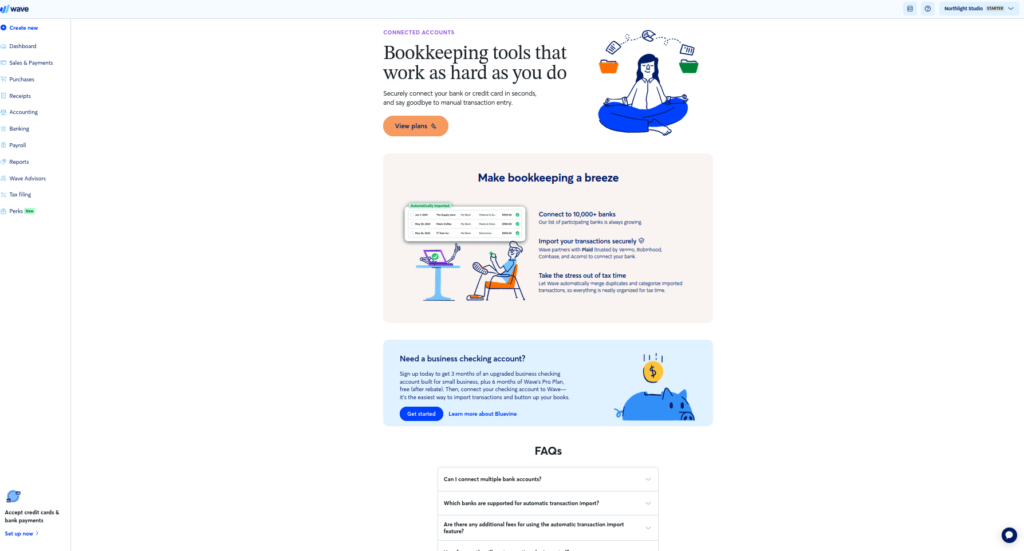
Worth switching over: yes. Zoho Books includes automatic bank feeds on its free plan. Not a trial, not a teaser — included. If this is your only complaint, you can fix it for $0.
“The transaction fees are eating me alive”
Half true, and the half that’s false is the interesting part. See the next section — this one deserves its own.
“The ‘Powered by Wave’ watermark looks unprofessional”
Wave’s free invoices carry a “Powered by Wave” mark, and it isn’t subtle. If you’re invoicing corporate clients, you notice it. They notice it.
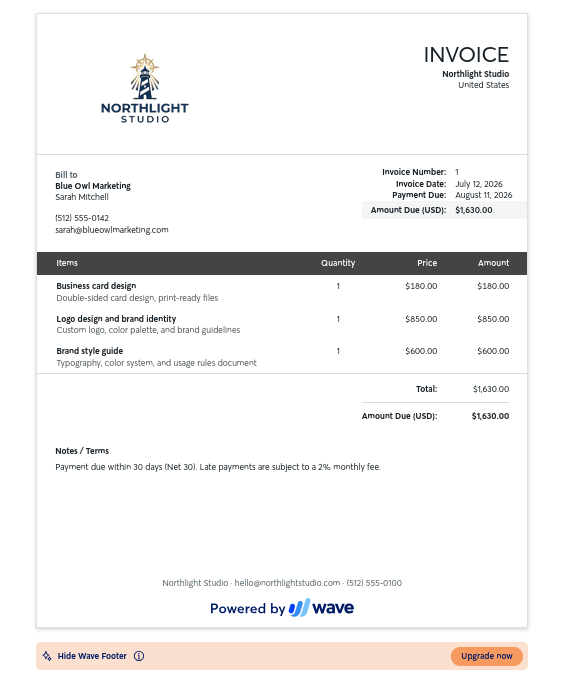
Worth switching over: maybe. It’s a real branding cost, but it’s also the cheapest possible reason to migrate a year of books. Ask yourself whether the watermark has actually cost you a client, or whether it just bothers you. Both are valid answers — just be honest about which one it is.
“I’m not in the US or Canada”
Then Wave was never an option. It only supports US and Canadian businesses.
Worth switching over: it’s not a switch, it’s a requirement. Zoho Books and Xero both operate internationally.
Does Wave Pro actually fix the fees?
This is the part nobody tells you, and it’s the reason this article exists.
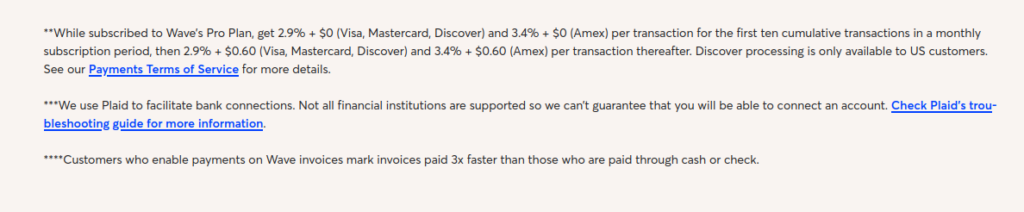
Wave’s free plan charges 2.9% + $0.60 per card transaction. Almost every comparison article online writes this as “2.9%” and quietly drops the sixty cents. It matters — on a $50 invoice, that’s another 1.2% on top.
So Wave sells you Pro, at $190/year, and one of the headline benefits is a better rate: 2.9% + $0. No per-transaction fee. Sounds like it pays for itself if you invoice enough, right?
Read the fine print.
That 2.9% + $0 rate only applies to the first 10 transactions each month. Transaction eleven onward, you’re back to paying the per-transaction fee — the same one you were paying for free.
Here’s what that means in money:
- Maximum possible saving: 10 transactions × $0.60 = $6.00 per month
- Best case per year: $72
- Cost of Wave Pro: $190/year
Wave Pro cannot pay for itself on processing fees. Not at 10 transactions a month, not at 50, not at 500. The saving is capped at $6/month by design, and $6/month never adds up to $190/year.
That doesn’t make Pro worthless — the bank feeds might be worth $190 to you on their own, and if they save you a monthly afternoon of CSV cleanup, they probably are. But buy Pro for the bank feeds, with your eyes open. Don’t buy it because the fee math looked like it worked. It doesn’t.
Verified against Wave’s US pricing page and Pro terms, July 2026. Wave changes pricing; check the fine print yourself before you pay.
Zoho Books — the closest thing to a free Wave replacement
If you’re leaving Wave for the bank feeds, this is where you land.
Zoho Books’ free plan covers businesses under $50,000/year in revenue, with 1,000 invoices and 1 user — and it includes automatic bank feeds at no cost. That’s the single thing Wave puts behind a $190/year wall, given away.
The trade-offs are real, and I ran a full year of fictional client data through it to find them:
- It expects you to understand accounting. Zoho is built on proper double-entry bookkeeping, and it doesn’t hide it. You’ll meet debits and credits on day one. If you came from Wave’s “just click the thing” simplicity, this is a wall.
- CSV import is fiddly. Their sample formats are picky, and getting a year of history in took real work.
- Invoice templates are more rigid than Wave’s.
- The $50k cap is a cliff. Cross it and you’re on Standard at $15/month (billed annually).
Paired with Stripe, Zoho’s processing runs 2.9% + $0.30 — half of Wave’s per-transaction fee, on a free plan.
I’ve written a full hands-on comparison of these two, with screenshots from a year of real usage in both: Free Accounting Software for Freelancers: Wave vs Zoho Books. If Zoho is your likely destination, start there — it goes far deeper than this page can.
FreshBooks
The usual recommendation for freelancers who bill by the hour. Time tracking and estimates are on every plan, and hours convert straight into invoices — genuinely useful if that’s your workflow, and something neither Wave nor Zoho does as cleanly.
No free plan. Starts at $19/month (Lite tier). Lower tiers cap your number of billable clients — Lite limits you to 5 — and extra team members cost $11/user/month.
Best if: you’re a service provider selling time, and invoicing is the center of your business.
QuickBooks Online
The one your accountant will ask for. That’s not a feature, it’s a fact — the US accounting profession standardized on it, and handing over a QuickBooks file at tax time is frictionless in a way nothing else is.
No free plan. US tiers run Simple Start at $38/month (1 user), Essentials at $75/month (3 users), Plus at $115/month (5 users), and Advanced at $275/month (25 users).
Best if: you have a CPA and they’ve already told you what to use.
Xero
Sits between Zoho’s rigidity and QuickBooks’ weight. Its distinguishing feature is unlimited users on every plan, which matters if you’re an agency rather than a solo operator.
No free plan. Starts at $20/month (Early tier), but the entry tier caps you tightly: 20 invoices and 5 bills a month. Unlimited invoicing means Growing, at $47/month.
Best if: you have a team, or you want your accountant in the books alongside you.
Should you actually switch?
Here’s the answer nobody selling software will give you:
If you invoice a modest volume and you don’t need automatic bank feeds, Wave’s free plan is still the best free accounting software on the market. Not “good for free.” Best.
It has something none of the alternatives have: no income cap. Zoho’s free plan dies at $50,000/year. Wave’s doesn’t die at all. You can bill $150,000 through Wave without paying a cent in subscription. Its invoicing is excellent, and it’s genuinely easy in a way Zoho isn’t.
Migrating a year of books is a real cost — a day of your life, minimum, plus the risk of something not lining up. Before you spend it, be specific about what you’re buying:
- Leaving for bank feeds? → Zoho Books. Real fix, costs $0. Go.
- Leaving for the fees? → Reread the Pro section. Wave free at 2.9% + $0.60 vs Zoho + Stripe at 2.9% + $0.30 saves you $0.30 a transaction. At 20 invoices/month that’s $72/year. Worth a migration? Your call — but now it’s an informed one.
- Leaving for the watermark? → Ask whether it’s cost you a client, or annoyed you.
- Outside US/Canada? → You don’t have a choice. Zoho or Xero.
- Just tired of Wave? → That’s allowed. But it’s not a software problem, and a new tool won’t fix it.
The best switch is the one where you can name what you’re getting. If you can’t finish the sentence “I’m moving to X because Wave can’t ___”, stay where you are.
Next: Free Accounting Software for Freelancers: Wave vs Zoho Books (2026) — a full hands-on comparison with screenshots from a year of use in both platforms.
Ryan Carter runs The Ledger Guide, where every tool gets tested on a real set of books before it gets recommended. Not an accountant — which is exactly why the reviews explain what the software actually does instead of what it should do. More about this site.
One Comment