Wave Pro Plan Bank Feeds: What Changed in 2026
Wave Pro plan bank feeds are no longer part of Wave’s free Starter tier. As of June 1, 2026, automatic bank sync, along with collaborator access and receipt scanning, moved behind Wave’s paid Pro subscription. If you picked Wave specifically because it was free, this is the update that changes that math.
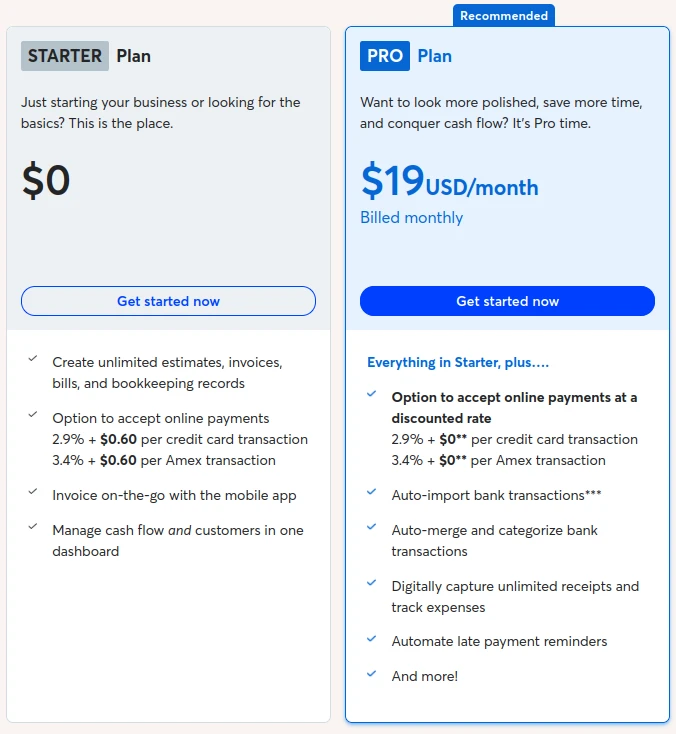
What Happened to Wave Pro Plan Bank Feeds
Before this change, connecting a bank account to Wave on the free plan gave you automatic transaction imports through Plaid, no manual entry required. Now, the free Starter plan still lets you connect a bank account, but only in read-only mode. Pulling those transactions in automatically for reconciliation requires the Pro plan, priced at $19 a month in the US (or $190 billed annually).
Existing free-plan users got an email about the change in late April 2026, ahead of the June rollout. For a product that built its reputation on being genuinely, permanently free, moving bank feeds behind a paywall is a meaningful shift, not a minor pricing tweak.
What’s Still Free on Wave’s Starter Plan
The Starter plan hasn’t disappeared, and it still covers unlimited invoices, estimates, and bills. What it lost is the automation layer: automatic bank feeds, OCR receipt scanning, and collaborator access (adding a bookkeeper, co-founder, or accountant to your account) are now Pro-only features. If you’re on Starter today, you can still use Wave, you’ll just be entering transactions manually instead of having them pulled in for you.
How This Changes the Wave vs Zoho Books Calculation
We covered the broader feature gap in our Wave vs Zoho Books comparison, but this pricing change narrows the gap even further. Wave’s main selling point for budget-conscious freelancers and small businesses was that the whole platform, including bank sync, cost nothing. At $19 a month for Pro, Wave now sits closer to mid-tier competitors on price while offering a smaller feature set than some of them.
If you’re already comparing Wave alternatives, it’s worth re-running the comparison with Wave’s actual current cost rather than the “free forever” reputation it built years ago. For businesses that were already leaning toward switching, this removes one of the last reasons to stay.
Should You Upgrade to Wave Pro or Switch?
That depends mostly on how much manual bookkeeping work you’re willing to take on. A few questions worth asking before deciding:
- How many bank transactions are you reconciling manually each month? More volume means more time saved by automatic feeds, which tips the math toward paying for them somewhere.
- Do you need collaborator access for a bookkeeper or accountant? If so, that’s now a paid feature on Wave regardless of which platform you choose.
- Have you looked at what $19 a month buys elsewhere? If you’re paying for Wave Pro either way, it’s worth comparing that cost against what other platforms include at a similar price point, including automated bank reconciliation.
If you’re leaning toward a move, our guide to migrating from Wave to Zoho Books walks through the process.
Quick FAQ
Is Wave still free? The Starter plan is still free, but it no longer includes automatic bank feeds, receipt scanning, or collaborator access. Those now require the Pro plan.
How much does Wave Pro cost? $19 a month in the US, billed monthly, or $190 a year if billed annually. Pricing varies by region.
Can I still see my bank transactions without upgrading? You can connect a bank account in read-only mode on the free plan, but automatic transaction import for reconciliation requires Pro.
For a closer look at how Zoho Books handles bank reconciliation by comparison, see our Zoho Books review.
Source: Wave’s Pro Plan, Receipts and Pro Plan subscription fees